.webp)
If you’ve ever taken on the daunting task of managing SEO for a site, you’ve no doubt spent plenty of time staring with dread at the Google Search Console Indexation report. Content needs to be visible to Google’s crawler before it has any hope of being visible to potential customers, and now you’re staring at hundreds of 404 pages that aren’t visible to anyone!
404s are the most common error on the internet, and the first one many SEO beginners and experts alike are likely to focus on during a technical SEO audit. For many, solving such a site issue is trivial, a method ingrained in them from hours of pouring over exports in spreadsheets. But what if, much like Morpheus, I was to tell you that everything you know about the world of 404 errors is a lie? That handling them effectively may not require the methods you expect?
Learn more about the best way to handle 404 errors on your business’s site from the SEO experts at BAW Creative, a leading digital marketing company in Barnsley.
What are 404 Site Errors?
If you’ve been on the internet for any period of time, you likely understand on some level what a 404 error page is communicating to you. In the simplest of terms, if you see a 404 error page, it means you’re trying to access a webpage that does not exist.
Say, for example, your cat decided to walk over your keyboard just as you were typing in our URL into your browser. Instead of heading to your trusted source for SEO advice, https://www.bawcreative.co.uk/category/seo, your feline friend points you in the direction of:
https://www.bawcreative.co.uk/category/seoolsdkhfnkhjs
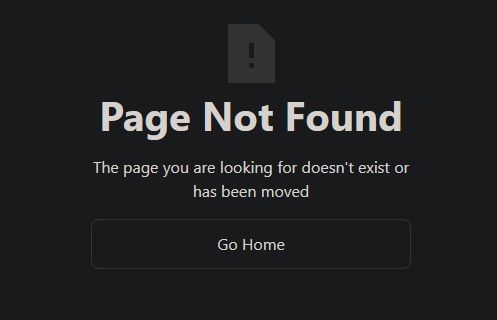
Unfortunately, we do not release blogs on the topic of ”seoolsdkhfnkhjs” as of yet, so after our server tries to point you in the right direction, it realises a mistake has been made and instead reports an error code, and displays an error page. It should look something like this:
What causes 404 Site Errors?
In order to fix a 404 error effectively, you need to understand both how the reporting tool you’re using and your audience will be encountering it. Here are a few common causes of 404 errors:
Mistyped Hyperlinks
Everyone makes mistakes, especially in the mad rush to get a new service or product page live! When linking to other pages, the slightest spelling mistake or miscommunication can result in a broken link. This is something most technical SEO auditing tools, such as Screaming Frog SEO Spider, can detect and highlight easily.
Luckily, the fix is easy too - just correct the link and ensure the correct URL is being pointed to. Don’t worry about SEO impact here, Google also detects such fixes quickly in most cases and, as we’ll discuss soon, 404 pages on your site may not have the impact you expect them to…
Broken Pages
If it’s not the link to it that’s broken, it’s often the page itself that’s the cause. From an incorrectly set slug to the tangled web of page URL changes and redirects many sites fall victim to, there are many issues that can cause a page to not display at the correct URL; Too many to cover in this guide, but if the cause of the error is truly eluding you, maybe it’s time to get in touch with the experts…
Indexation Mis-match
The internet is incomprehensibly vast, growing and changing every minute. This leaves Google and AI search crawlers constantly on the backfoot, combing through millions of sites to rewrite its record of pages available to users. Because of this, there can be a delay between the links and pages Google finds on your site in one crawl and the changes you’ve made since. Google also likes to try and find links you did not mention in the sitemap to get ahead, crawling a page before you make it easily available for indexation.
A combination of the above is what most often causes the horrifying scene we started our article with, when you check your indexation report only to find hundreds of pages aren’t being shown by google - only to explore further and find out these pages are reporting 404s too.
The good news is that you need not worry next time, 90% of those pages will be old URLs, pagination links, and other such oddities you can safely ignore. The bad news is, you’ll need to go through that report with a fine tooth comb to ensure you catch all the real indexation isues.
This is what makes technical SEO tools like Screaming Frog SEO Spider so valuable, they crawl your website in real-time and report real errors, many that Google’s search reporting does not cover.
The Best Way to Fix 404 Errors
In many cases, the typical SEO advice for 404 errors is to either fix the broken link, or establish a redirect that takes any users who arrive on an old, 404 URL to a different page. However, according to recent advice from Google’s resident algorithm expert John Mueller, having 404 pages on your site that aren’t being redirected may be less damaging than you’d think:
- 404: URL doesn't get indexed; it's an invalid URL, so this is fine. Just to be clear: 404s/410s are not a negative quality signal. It's how the web is supposed to work.
- 410: It's a 404, essentially.
- Homepage redirect: URL doesn't get indexed. Maybe it stays soft-404 & gets crawled (not great, not terrible).
- Category redirect: URL doesn't get indexed. Potentially a short-term support for the category page, but still confusing to users. (If you do this, at least display something on the page explaining how they got there.) Longer-term soft-404.
- 200 with 404 page content: definitely soft-404.
Based on what was said here, it might actually be better from an SEO perspective to allow a page to remain 404’d, rather than redirecting users back to a category or home page that they have no idea how they reached.
As you can see, there’s a lot that goes into understanding 404 errors on your website, and this is just one small part of your Search Engine Optimization. If you’d rather leave your site optimization to the experts, we’re here to help. If you’re looking for more SEO top tips and guides, we’ve got you covered there too.
Need Help With Your SEO?
At BAW, we don’t just drive more visitors to your site. We attract the right ones. Our focus is on getting your brand seen by the people who matter most: your ideal customers.
Frequently Asked Questions
Smart Reads for Growing Brands
Our blog isn’t fluff. It’s packed with lessons we’ve learned building high-performing brands and ecommerce sites that convert.
.webp)

.webp)

.webp)